.svg)
Classes vs. IDs in HTML/CSS
Āhea, me pēhea te whakamahi pai i ngā kara me ngā tuakiri CSS
When and how to use CSS classes and IDs effectively
7 September 2025Basic Concepts of Selectors
CSS Classes
CSS Syntax:
.class-name { }
HTML Usage
class="class-name"
✓ Reusable across multiple elements
✓ Lower CSS specificity
✓ Perfect for styling components
✓ Can have multiple classes per element
CSS IDs
CSS Syntax:
#id-name { }
HTML Usage
id="id-name"
✓ Unique - only one per page
✓ Higher CSS specificity
✓ Great for JavaScript targeting
✓ Used for form labels & anchors
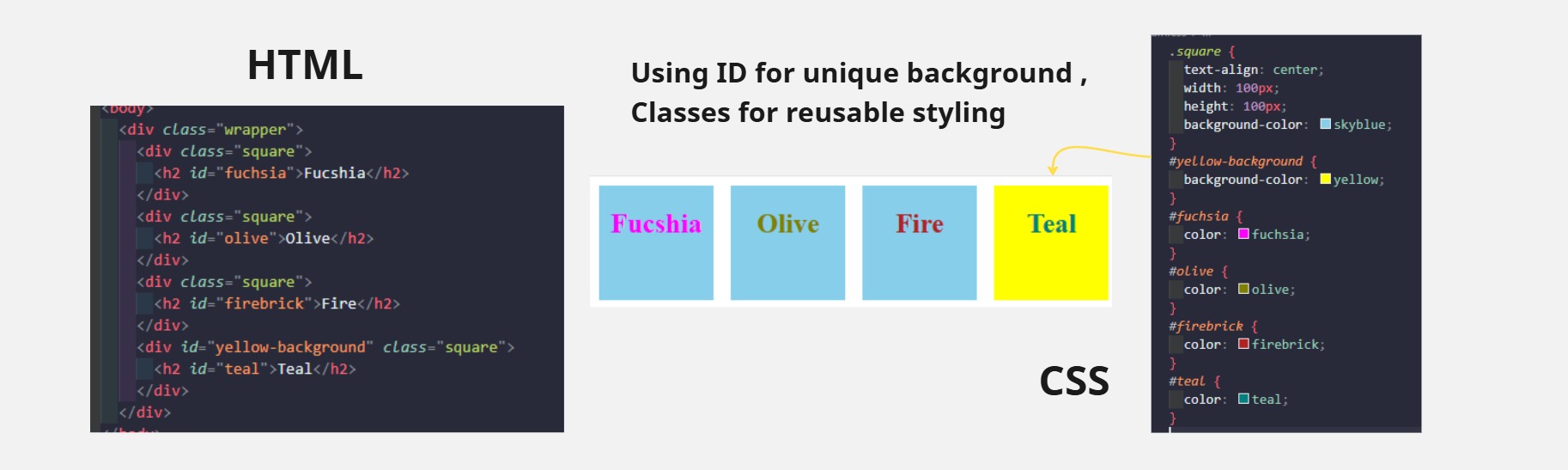
When working on web projects, CSS classes and IDs both used to style HTML elements, but they serve different purposes. IDs are like Student Numbers Totally unique to one person. while Classes are like group names. Lots of people can be in the “Developer” class. So, if there's a specific section or element that needs distinct styling or behavior, an ID is the go-to choice, otherwise if you want share the styles or behavior to the multiple element or groups, Classes is common choice for being reusable selector.
CSS Specificity Hierarchy
We thought CSS IDs were a top priority for modifying an
object, but they’re really not. Inline styles (ex.
style="...") have the highest priority because the
style is right there on the element itself, which the browser
reads immediately. Then CSS IDs (ex. #header)
come after because they identify the element uniquely, but with
less priority than inline styles since those are more specific.
Next are CSS classes (ex. .button{ }), which
target multiple elements. They have a moderate level of
specificity while staying flexible for reusing styles. Lastly,
Element selectors (ex. div{ }, p{ }) have the
lowest specificity because they target broad groups and don’t
differentiate individual elements.
Quick Insight
- Style with classes
- Target with IDs (for JS)
- Avoid using IDs in your stylesheets