The Magic of JavaScript
E kite me pēhea te mahi a JavaScript hei whakamīharo i ngā paetukutuku
See how JavaScript makes websites interactive and fun
19 September 2025If you've ever wondered how websites become interactive and dynamic, you're in the right place. JavaScript is the programming language that brings websites to life!
Think of websites you use daily when you click a button and something happens, when content updates without reloading the page, or when you see smooth animations. That's JavaScript working its magic!
Think of Building a Website Like Building a House
HTML: The Foundation & Structure
HTML is like the foundation, walls, and basic structure of your house. It defines what rooms you have and where they are
<!DOCTYPE html>
<html>
  <head>
      <title>My House</title>
  </head>
  <body>
    <h1>Welcome Home!</h1>
    <button id="light-switch">Turn on lights
    </button>
  </body>
</html>
CSS: Interior Design & Decoration
CSS is like the paint, furniture, and decoration that makes your house beautiful and comfortable.
body {
    font-family: Arial, sans-serif;
    background-color: #f0f0f0;
    margin: 0;
    padding: 20px;
}
button {
    padding: 10px 20px;
    background-color: #007bff;
    color: white;
    border: none;
    border-radius: 5px;
    cursor: pointer;
}
JavaScript: The Electrical System
JavaScript is like the electrical system that powers your house. It makes things work when you interact with them.
// When someone clicks the light switch
document.getElementById('light-switch')
  .addEventListener('click', function() {
// Change the room's lighting
    document.body.style.backgroundColor = '#ffffe0';

// Update the button text
    this.textContent = 'Lights are on! ✨';
});Control Flow & Loops: Watering Plants
Every gardening matters, you make decisions based on conditions. In JavaScript, we use if/else statementsfor this:
Watering Plants Decisions
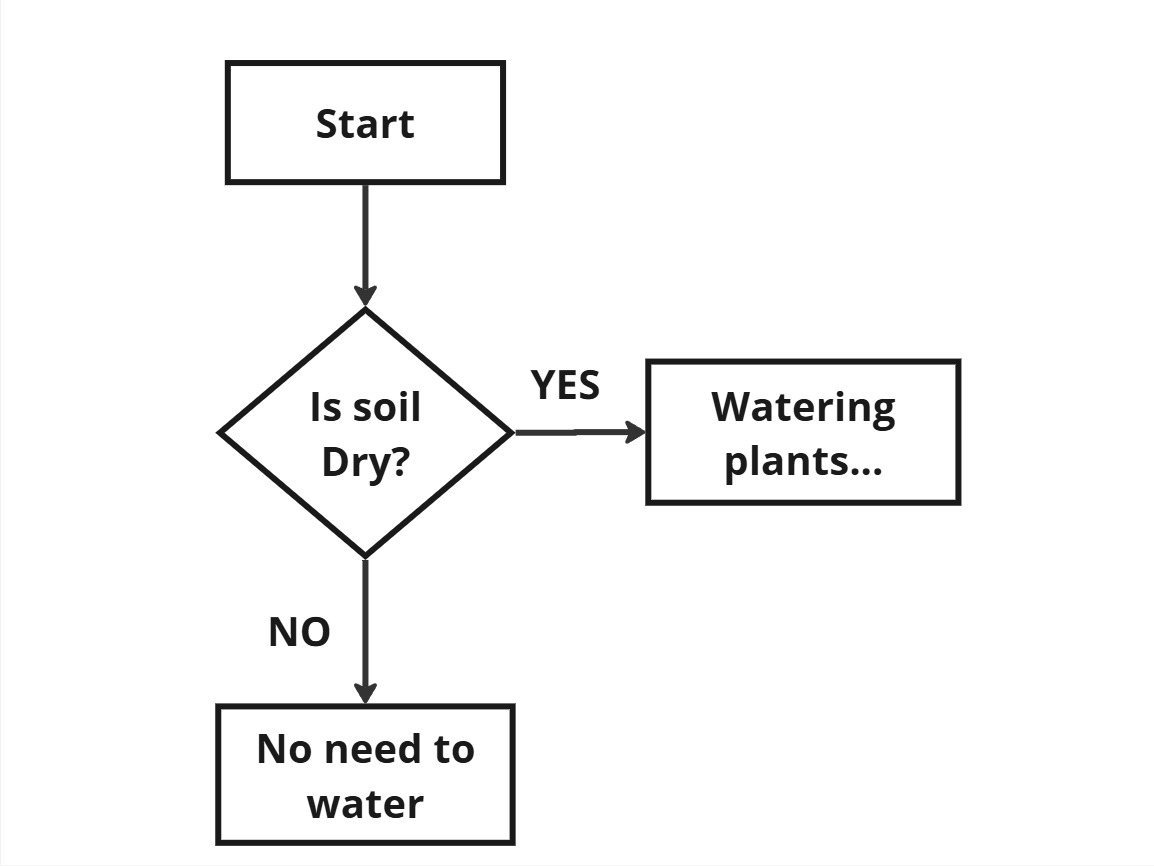
// Check if we need watering plants
let soilIsDry = true;
if (soilIsDry) {
  console.log("Watering plants...");
} else {
  console.log("No need to water.");
}
Some watering a plant steps need to be repeated. That's where loops come in handy
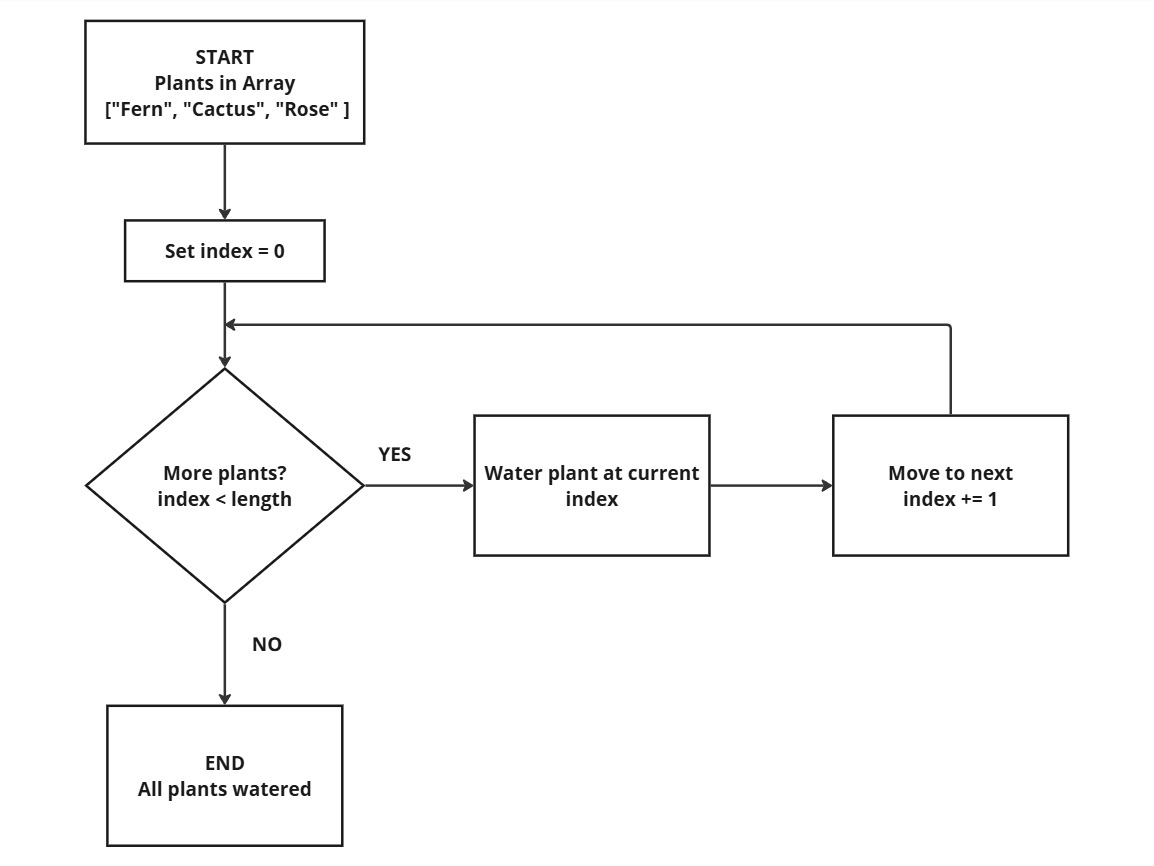
// using 'for...of' loop  for a set number of watering

const plants = ["Fern", "Cactus", "Rose"];

for (let plant of plants) {
console.log("Watering " + plant);
}
DOM: Your Site's Remote
The DOM (Document Object Model) is like a TV remote control for your webpage. Just as a remote lets you change channels, adjust volume, and control your TV, the DOM lets JavaScript interact with and change your webpage
Changing Website Content
// Select elements by class name
const firstButton = document.querySelector('.btn');

// Find an element and change its text
document.querySelector('h1').textContent = 'Hello, World!';

// Change element style
title.style.color = 'red';

// Add click event listener
firstButton.addEventListener('click', () => {
  alert('Button clicked!');
});Organizing Data: Array vs Objects
JavaScript has two main ways to store multiple pieces of information such as Arrays and Objects. Think of them like different ways to organize information on your phone
Arrays: The Contact List
Arrays are ordered lists where each item has a number that starting from 0. Perfect for when order matters
Grocery List
// Creating a grocery list
let groceryList = ['milk', 'bread', 'eggs', 'apples'];

// Accessing items by position
console.log(groceryList[0]); // 'milk' (first item)
console.log(groceryList[1]); // 'bread' (second item)
console.log(groceryList[3]); // 'apples' (fourth item)

// Adding items to the list
groceryList.push('bananas');
console.log(groceryList);
// ['milk', 'bread', 'eggs', 'apples', 'bananas']

// How many items do we have?
console.log(groceryList.length); // 5
Objects: The Contact Details
Objects store related information with descriptive names. Like a contact with name, phone, email, etc.
Contact Details
// Creating a contact entry
let contact = {
    name: 'Jonell Balanay',
    phone: '123-456-7890',
    email: 'jonell@email.com',
};

// Accessing information by name
console.log(contact.name);    // 'Jonell Balanay'
console.log(contact.phone);   // '123-456-7890'
console.log(contact.email);   // 'jonell@email.com'

// Alternative way to access
console.log(contact['name']); // 'John Smith'

// Adding new information
contact.school= 'Dev Academy';
console.log(contact.school); // 'Dev Academy'| Arrays | Objects |
|---|---|
| Use numbers to access items → groceryList[0] | Use descriptive names → contact.name |
| Good for lists of similar items | Great for grouping related but in different information |
Functions: Your Code's Best Friends
Functions are like recipes in programming. You write the instructions once, give it a name, and then you can use that recipe whenever you need it
Common function Examples
//A function to say hello
function sayHello() {
  console.log("Hello!");
}
sayHello();

// function that adds two numbers and returns the result
function add(a, b) {
  return a + b;
}

//A function to greet a person by name
function greet(name) {
  console.log("Hi, " + name + "!");
}
greet("Alice");

//A function to get random number from minimum to maximum input
function getRandomInt(min, max) {
  min = Math.ceil(min)
  max = Math.floor(max)
  return Math.floor(Math.random() * (max - min) + min)
}